Inbound Verification
Voxtelesys signals STIR/SHAKEN verification results on inbound calls via SIP headers so your equipment or application logic can act on call authenticity data.
Verification Modes
Voxtelesys supports three inbound verification modes, configurable per inbound trunk group in the Voxtelesys Portal. The mode controls which SIP parameters and headers are added to calls delivered to your endpoint.
| Mode | Description |
|---|---|
| Off | No verification is performed and no STIR/SHAKEN headers are added or modified |
| Basic Verification | Adds a verstat parameter to the P-Asserted-Identity SIP header indicating the validation result |
| Enhanced Verification | Basic Verification plus P-Attestation-Indicator and P-Origination-ID SIP headers for additional verification data |
Off
In Off mode, calls are delivered without any STIR/SHAKEN headers added or modified.
Basic Verification
In Basic Verification mode, a verstat parameter is appended to the P-Asserted-Identity header. This parameter reflects the outcome of the STIR/SHAKEN signature validation.
| Value | Description | Interpretation |
|---|---|---|
TN-Validation-Passed | The Identity header signature was present and validated successfully | The carrier has confirmed that the caller is authorized to use the specific phone number. Typically shown as a "Verified" checkmark on smartphones. |
TN-Validation-Failed | The Identity header was present but signature validation failed | The call may have been tampered with in transit or the signature was forged by an unauthorized entity. |
No-TN-Validation | No Identity header was present or validation was not performed | No verification was attempted. This is common for calls originating from older "TDM" (landline) networks or international gateways that don't support the protocol yet. |
Example:
P-Asserted-Identity: <sip:[email protected];verstat=TN-Validation-Passed>
Enhanced Verification
In Enhanced Verification mode, the attestation level and origination identifier are provided in the following SIP headers:
| Header | Description |
|---|---|
P-Attestation-Indicator | The attestation level assigned by the originating carrier (A, B, or C) |
P-Origination-ID | A unique call identifier used for STIR/SHAKEN traceback |
Example:
P-Asserted-Identity: <sip:[email protected];verstat=TN-Validation-Passed>
P-Attestation-Indicator: A
P-Origination-ID: c7c5f938-3064-47a7-b1c5-698ee934eacd
Caller ID Header
Verification results are added to the P-Asserted-Identity header, so Basic Verification and Enhanced Verification require the trunk group's caller ID header to be set to P-Asserted-Identity.
| Header | Description |
|---|---|
Remote-Party-ID | Caller ID is sent in the Remote-Party-ID header. This is the default. Only the Off verification mode is available |
P-Asserted-Identity | Caller ID is sent in the P-Asserted-Identity header (RFC 3325). All verification modes are available |
The caller ID header applies to every call delivered to the trunk group, not only verified calls. Before switching it, make sure your PBX or application reads caller ID from P-Asserted-Identity, or caller ID may stop displaying.
Configuring Verification
Inbound verification is managed in the Voxtelesys Portal under Channels > Voice > SIP Trunking. Expand an inbound trunk group and open the Caller ID & Verification tab to see its current settings.

To turn on verification:
- Click the edit button on the Caller ID & Verification tab.
- Under Caller ID Header, select P-Asserted-Identity.
- Under STIR/SHAKEN Verification, select Basic Verification or Enhanced Verification.
- Click Save.
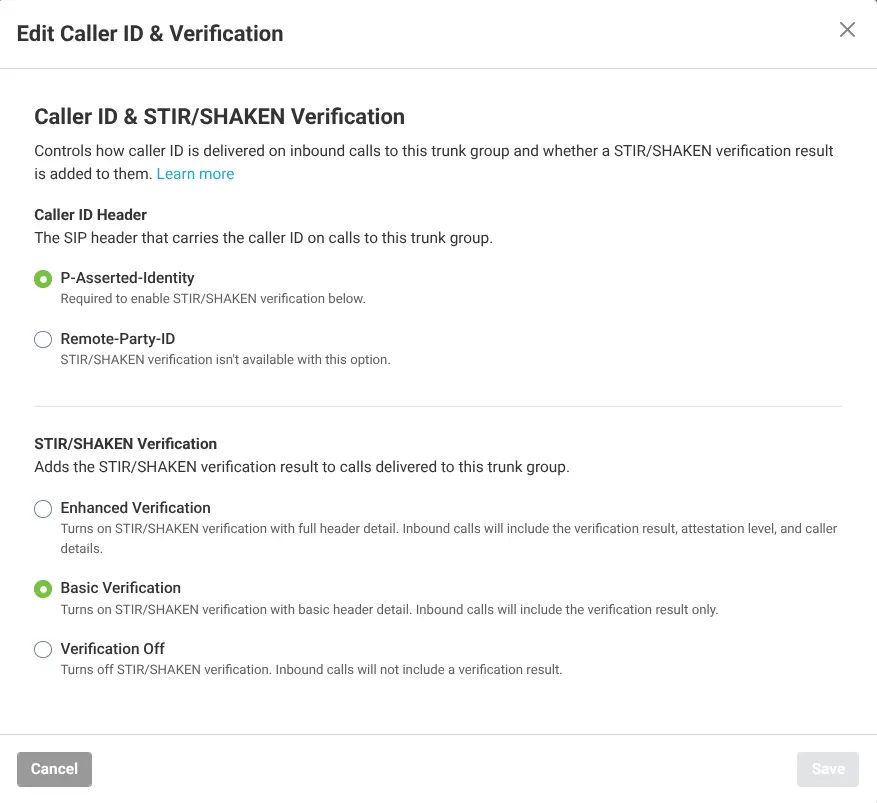
The new settings apply to calls delivered to the trunk group after you save.
To turn verification off, set STIR/SHAKEN Verification to Off. Switching Caller ID Header back to Remote-Party-ID does this automatically, since no verification mode besides Off is available with that header.